

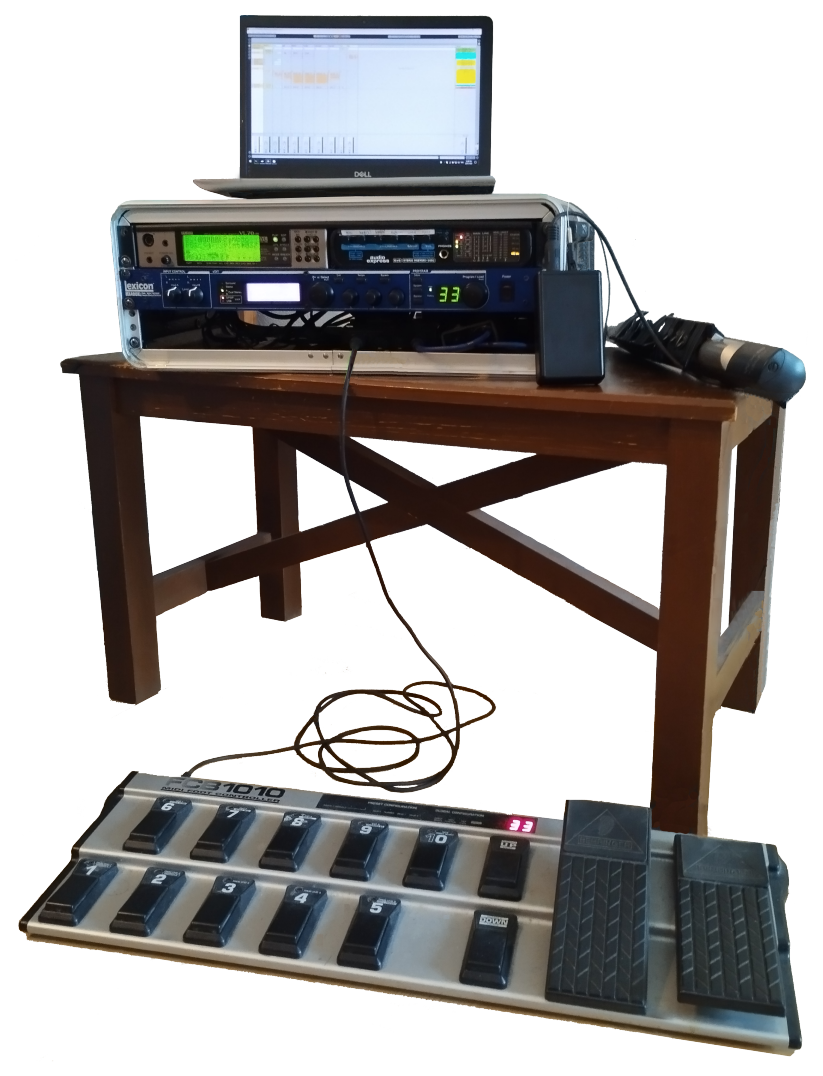
 We'll start off by setting up the VL70‑m. I use Patchman's Turbo VL chip, which provides a set of new sounds that are significantly better than the ones that come with a stock VL70‑m, but the instructions here apply regardless.
Browse through the sounds in the Pr1 and Pr2 banks, find ones you like, then save them in one of the 64 user slots in the INTERNAL bank.:
- press
- use the buttons to navigate to the STORE option, then press
- use the buttons to select which slot you want to save to
- press to save the patch
Later, we will set up an FCB-1010 MIDI foot controller to control everything. It has 2 expression pedals, and I've configured them to always use CC#4 (foot controller) and CC#7 (volume). Each patch can be individually configured to respond to CC#4For example, Scream and Growl work well for wind instruments, while Damping and Harmonic Enhancer can produce interesting variations for stringed instruments., so I can use the first expression pedal to subtly change the sound while I'm playing, and the second expression pedal to adjust the volume.
To edit a patch to respond to CC#4:
- press , and choose CONTROL
- use the buttons to choose a parameterThese are documented on p48 of the Owner's Manual.Note that more than one parameter can be configured to respond to CC#4., and to change themYou'll see a lot of parameters configured to respond to CC#2. This is breath control, and so the sound will change according to your breathing.
- when you're done, press to go back to the menu, and choose STORE to save your changes
There are more options in the OTHER page, notably Vib RateI don't like the vibrato much, so I usually set it really low (-64), and add vibrato by pulsing the airflow and Voice LevelI try to set all my patches to have roughly the same volume.. You can also change the patch's name here.
There are also a few other options in the VOICE PLAY sub-control mode, which can be accessed by simultaneously pressing both buttons, and using the buttons to scroll. The main one of interest is NoteSft, which lets you shift the octave the WX5 plays in.
Again, don't forget to save your changes when you're done!


