

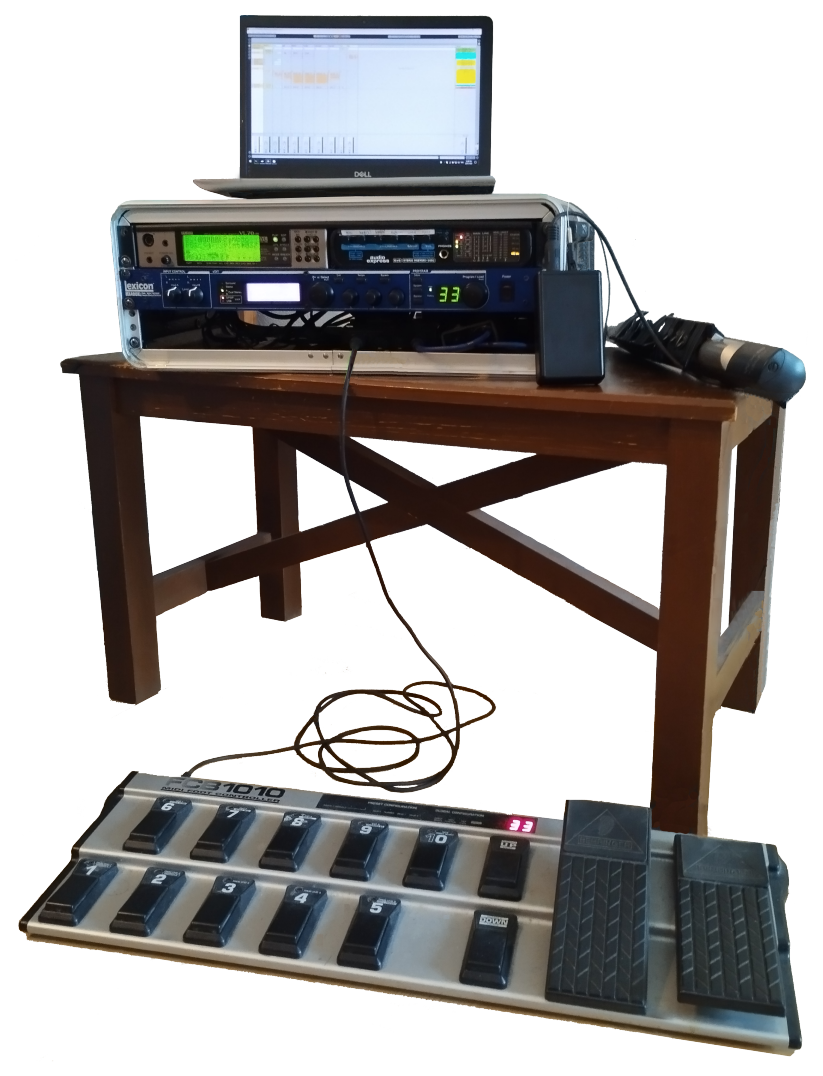
I use a Behringer FCB1010 MIDI foot controller to control the rig, in particular, to select patches on the VL70‑m, and the corresponding Lexicon effects I want to use for them .
Configuring the FCB1010 via the foot pedals is a colossal PITA, so do yourself a favor and head over to Mountain Utilities and download their editor program.
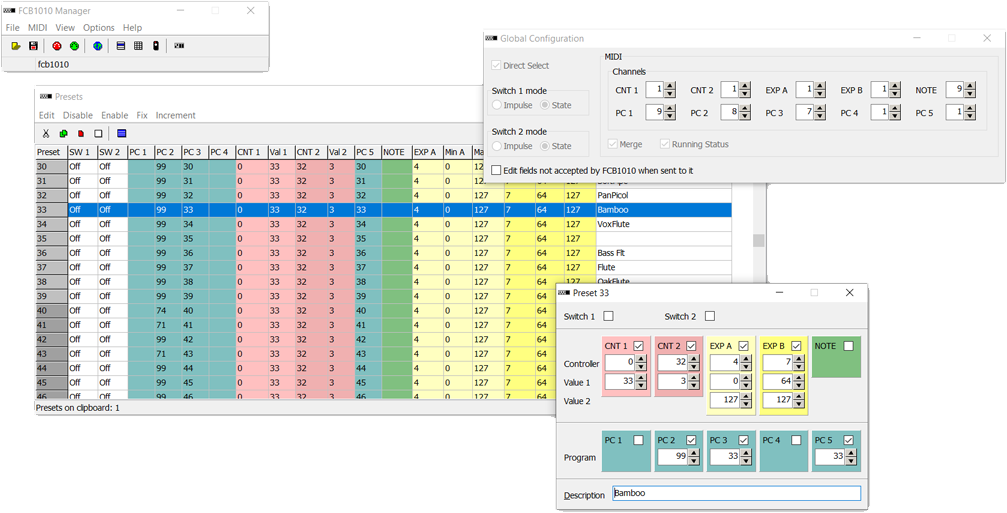 Load the current FCB1010 configuration into the program, and you should see something like this:
The FCB1010 controller is powerful, but the manual is difficult to understand, and you really need to know what's going on to be able to configure it.
Each of the 100 available presets can do the following:
- send up to 2 CC values
- send up to 5 Program Change messages
- configure the CC# and range for each expression pedal
- send out a single MIDI note
The key thing to understand is that each of these are sent out on pre-defined, globally configured MIDI channels.
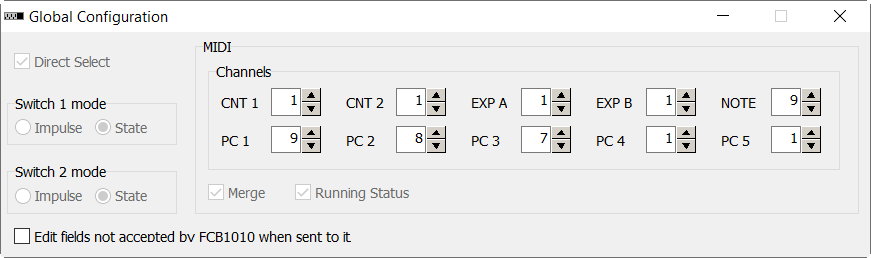 This is what we see in the Global Configuration dialog:
- both CC values will be sent out on MIDI Channel 1 (CNT1 and CNT2)
- both expression pedals will work on MIDI Channel 1 (EXP A and EXP B)
- MIDI notes will be sent out on MIDI Channel 9 (NOTE)
- the 5 Program Change messages will be sent out on MIDI Channels 9, 8, 7, 1 and 1 (PC1-5)Although I don't actually use PC1 and PC4.
My devices are set up to listen on the following MIDI channels:
| 1: | VL70‑m |
| 7: | Lexicon A |
| 8: | Lexicon B |
| 9: | Ableton Live |
We can now interpret what's in the Presets window:
 When I stomp preset #33:
- a Program Change #99 message will be sent out on MIDI Channel 8 (PC2) i.e. Lexicon B
- a Program Change #33 message will be sent out on MIDI Channel 7 (PC3) i.e. Lexicon A
- a CC#0 message with value 33 will be sent out on MIDI Channel 1 (CNT1) i.e. VL70‑m
- a CC#32 message with value 3 will be sent out on MIDI Channel 1 (CNT2) i.e. VL70‑m
- a Program Change #33 message will be sent out on MIDI Channel 1 (PC5) i.e. VL70‑m
- the first expression pedal will send CC#4 messages (0-127) on MIDI Channel 1 (CNT1) i.e. VL70‑m
- the second expression pedal will send CC#7 messages (64-127) on MIDI Channel 1 (CNT2) i.e. VL70‑m
Patch #33 on my VL70‑m is a copy of Patchman's Bamboo patch, #33 on the Lexicon is the reverb/delay I want to use for it (Vocal+Inst1), and #99 on the Lexicon is an empty patch i.e. I only want one effect for this sound.
The two CC messagesDocumented on p26 of the Owner's Manual. sent out on CNT1/CNT2 to the VL70‑m will select the INTERNAL bankThis contains the patches we selected earlier., and is sent before the PC5 message is sent, which will then select the VL70‑m patch from the correct bank.
Managing the presets
To keep things simple, PC3 and PC5 are always the same as the FCB1010 preset number i.e. if I stomp preset #12, it will select patch #12 on the VL70‑m, and #12 on Lexicon A. Lexicon B is usually #99 (my "empty" patch), but a few presets select something here, as well.
I also have presets to only select something in Lexicon B (e.g. to fatten the sound, or generate harmonies), which lets me add effects to a sound as I'm playing:

MIDI routing
If you look at the the layout diagram, the MIDI routing is straight-forward:
- MIDI is sent wirelessly from the WX5 to the merge box, where it is merged with MIDI from the foot controller, and sent to the VL70‑m's MIDI INIf I'm not using wireless MIDI, the WX5 plugs into the front of the VL70‑m with a cable, and the foot controller is the only thing going into the MIDI merge box..
- MIDI is sent from the VL70‑m to the Lexicon (so that the foot controller can tell it what presets to use)
- MIDI is also forwarded from the Lexicon (via its MIDI THRU port) to the MOTU Audio Express, which then sends it to Ableton LiveWhich is listening for MIDI messages from both the WX5 and foot controller. running on the laptop over USB.
Controlling Ableton Live
I have 10 presets configured to send out MIDI notes, like this:
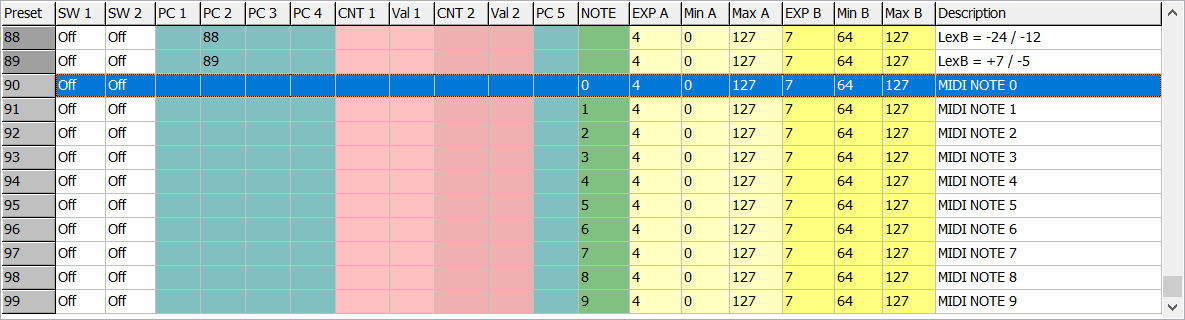 When I stomp presets #90 through #99, a MIDI note will be sent out on MIDI Channel 9, where Ableton Live is listening for these notesAbleton is also listening for notes on MIDI Channel 1, which lets me trigger things by playing certain notes on the WX5. and will do something in response e.g. trigger a scene.
Configuring the Lexicon MX400 to use the User bank
The Lexicon MX400 has the unfortunate behavior of defaulting to the Factory bank after it has been turned on. While it's possible to send a MIDI message to select the User bank (CC#32, value=1), it's tricky to do this from the FCB1010, because we need both CNT1 and CNT2 to be set to MIDI Channel 1 (so that we can send CC messages to the VL70‑m), but the Lexicon is listening on channels 7 and 8.
The work-around is:
- temporarily configure both Lexicon A and B to listen on MIDI Channel 1
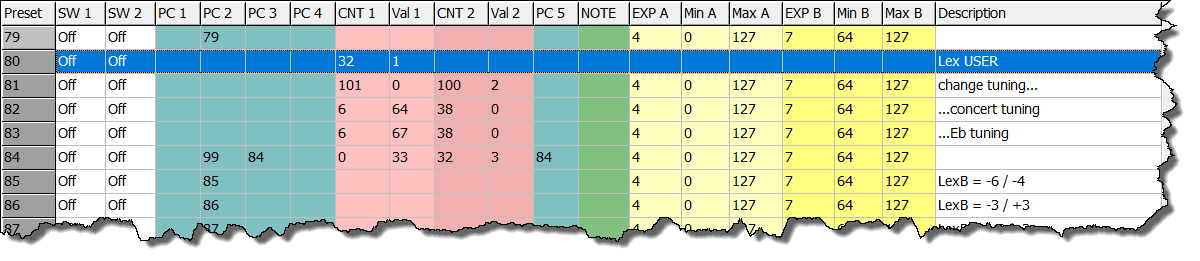
- stomp preset #80 to send them both the MIDI message to select the User bank (see below)
- stomp any other preset (to finish the User bank selection)
- restore the original MIDI Channel numbers (7 and 8).
Changing the tuning of the VL70‑m
I also have presets to change the tuning of the VL70‑mI also play alto sax, so it's often convenient to play a song in Eb, rather than concert.. The MIDI messages that need to be sent are a little complex, and have to be spread over two presets (see the screenshot above):
- stomp preset #81, then #82 → change to concert tuning
- stomp preset #81, then #83 → change to Eb tuning
Cheat-sheet
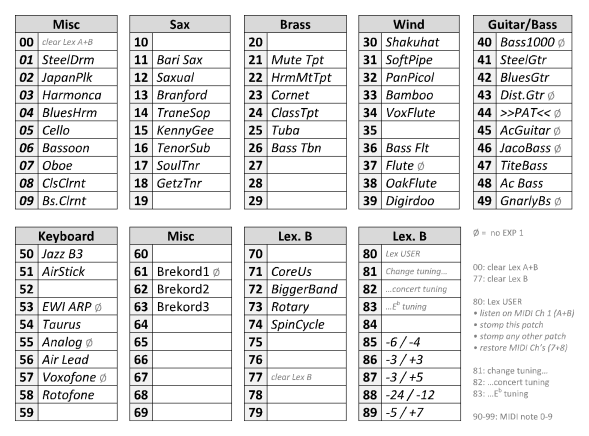 This is a cheat-sheet that I have printed out and laminated, that I can refer to during a gig.
The source Word document is available here.
Note that where I've put each preset is often determined by the layout of the pedals on the FCB1010. For example, my favorite presets in each group are #11, #22, #33, etc., which can be selected very quickly by double-stomping a single pedalI run the FCB1010 in Direct Select mode, where presets are selected by stomping a 2-digit number, rather than having to select a bank, and then stomping a single pedal to select a preset within that bank.. Numbers like #32 and #38 are almost as quick, while less-used presets are put in slots that are slower to select e.g. #56.


